Showing posts with label web browser. Show all posts

Friday, July 3, 2009

Upgrade to Firefox 3.5

Firefox 3.5 is out with whole lot of improvements and features.

  • Plugin free video/audio/media. (With new HTML Standard support)
  • Private browsing (Porn Mode)
  • Improved Tabs
  • Much faster rendering.

Find out more about Features, Performance, ecurity and Speed Mozilla Firefox.

You can download all new Firefox 3.5 or Just click on Help menu then select Check for Updates to upgrade web browser.

Happy browising!

Tuesday, September 2, 2008

New Google Web Browser - Chrome


The newest service from Google is called "Chrome", it is a web browser with stunning user interface with but not bulky or heavy on resources. Actually nice implementation of KISS principle.


Chrome supports tabs as other web browsers and the other main features are,
  • Web application shortcut creation
  • Amazing crash control, If one web application crashes it won't affect other tabs.
  • And security features such as skipping "History" for certain pages, unsafe/malware/phishing site warnings.
  • Instance book marking as in firefox 3 buy cling start icon.
  • Can import data from Firefox and Internet Explorer
  • Nice download manager
  • Web History, Search, suggestions all in one field.
  • Opera like speed dial.
Google chrome is based on open source technologies from Firefox and web kit engine. Google chrome is an open source software and based on multiple licenses mainly BSD license. Google Chrome is currently available for Microsoft Windows only.

Links


Story Behind Crome


Ten Features of Chrome

Thursday, July 31, 2008

xAurora - yet another web browser?


xAurora claims to be developed using assembly language (which accounts for its very small size), and claims to be very fast and secured compared to other web browsers. xAurora has very tightened security.


xAurora introduction presentation claims that other web browser security model is only considering about "Application security" and "System security" but xAurora security model includes both "Application security" and "Systems security" plus "Kernel security". Probably it is touching the kernel space also.

Features of xAurora
  • Artificial Intelligent Threat Management System
  • Web browser runs on kernel mode.
  • Contains multi proxy, bounce proxy, chain proxy and reverse proxy features.
  • Has multi network and pure hardware acceleration.
  • Tweaks windows TCP/IP stack to archive maximum performance.
Default user interface looks very messy. But not to worry you can always configure it. xAurora also enriched with several skins, plugins. xAurora doesn't have a official web site yet it was introduce using a Sri Lankan web forum call Elakiri.com. This web browser is developed by Sri Lankan, Dr. Sameera De Alwis (A.K.A. HackerZMafiA). And this web browser is funded by ICTA (Information and Communication Technology Agency - Sri Lanka).

So I'm Interested, where can I find it?

Monday, May 26, 2008

Apple Safari for Windows

What is Safari?


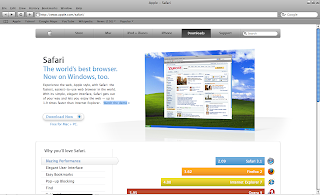
Apple Safari is the default web browser for MacOS X for Apple users. Now it is available for Windows user. With a GUI similar to iTunes, it is an eye candy.
On the Apple Safari page, they say that "Safari is the world's best browser" and its performance on "HTML rendering and Javascript outperformances other popular browsers (Mozilla Firefox 2, Opera 9 and Microsoft Internet Explorer 7) by considerable margin.

Pros
Some features of the windows version of Safari are,
  • Tabbed browsing.
  • Spelling Checker
  • Innovative search feature. (Features As-you-type search as in Mozilla Firefox)
  • Auto fill feature
  • Pop-up blocker
  • Eye candy - The way it shows the message windows is unique to Safari.
Cons
Safari is available for free on Apple website. (Links are provided in the end of this post.)
Apple recommends,
  • Microsoft Windows XP or Vista
  • At least 256MB RAM
  • 500 MHz Pentium class processor or better.
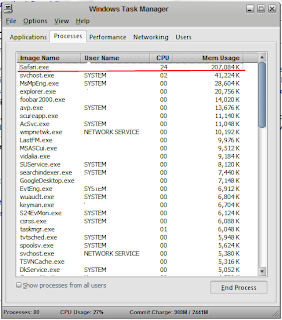
But on my laptop (Running Microsoft Windows XP, 1 GB RAM, Intel Centrino CORE2 Duo 1.66 GHz processor) the Safari runs bit slow. Sometimes it consumes 207,084KB memory. But on idle it consumes 54,000KB to 61,000KB of memory. So it is heavy on resources, but I guess it is the price that we have to pay for such an eye candy. The performance on Windows version will be improved in the upcoming releases.


Information

All trademarks are property of their respective owners.